 Antaryami
App walkthroughs
Your life, area by area: enter Antaryami with one question, not a verdict
You might open an astrology app because something feels tangled: a working week, a family conversation, a course you cannot quite begin. A complete chart can make that tangle look even larger. Antaryami's Life room offers a different entrance: organise your curiosity around a subject, then inspect how the app has read that subject. In this guide, Nitish Raj Walia follows the actual interface using fictional adult details. The useful benefit is a more navigable explanation, not proof that a chart can determine your future. Start with a question you can describe in ordinary language and keep the real circumstances beside the screen.
Describe the situation before choosing an area
There is a difference between asking what your life means and asking why a particular responsibility feels difficult this week. The second question has a setting, a person involved and something you might be able to change. Write that setting in your own words before selecting a category. You do not have to record it inside the app. A private note can be enough to keep your attention on the original concern instead of collecting every interpretation the interface makes available.
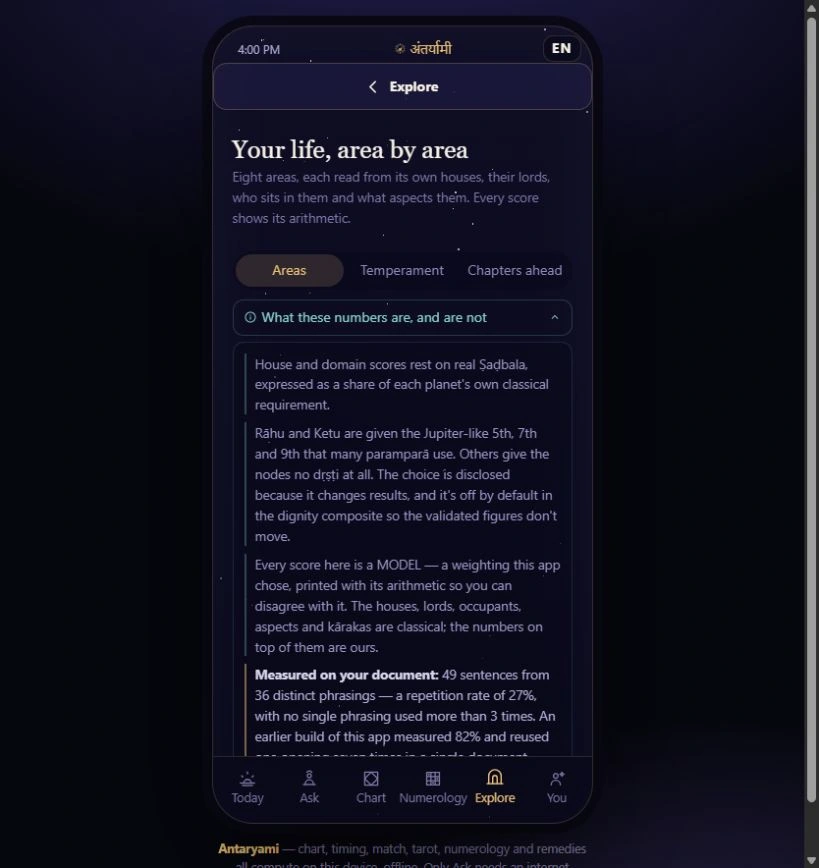
The inspected Life room contains expandable subjects for work, learning, money, family connections and other themes. Its category names guide navigation; they are not evidence that every person lives those subjects in the same way. A marriage-labelled area may not describe your circumstances, and a going-abroad theme may be irrelevant to a local trip. Choose the nearest useful subject, but leave mismatched assumptions behind. An organised interface should make it easier to ask your question, not require you to reshape your life to fit a menu.
Keep the selected person attached to the explanation
This demonstration uses a fictional adult named Nitish. The displayed readings belong to that example, even when a phrase sounds familiar. In personal use, confirm the intended profile and its birth details before opening a life area. The account owner and a selected family member are not automatically the same person. A meaningful label such as work or relationships does not correct a profile-selection error; it simply makes the wrong person's explanation easier to read if you skip that first check.
The screen draws on the selected chart and, where available, period and transit context. That makes the calculation snapshot relevant as well as the name. A screenshot is a record of one inspected preview state, not an ever-current message for anyone who reads this article. If your details are approximate, preserve that uncertainty when you discuss the result. Do not turn an estimated time into a verified birth record because the app renders a confident paragraph or a neatly arranged set of indicators.
Read three questions instead of searching for one score
Life separates the starting interpretation, the support around it and its current activation. The app calls these promise, support and right now. They answer different questions within its astrological model. Promise concerns its reading of the natal starting conditions; support concerns other chart factors; current activation concerns the supplied timing context. A subject can receive different descriptions across those lanes without the interface necessarily contradicting itself. Read the explanatory line under each label before trying to combine the words into one conclusion.
For instance, a subject might be interpreted as modest at its starting point yet supported by other factors and prominent in the current period. That does not establish that an opportunity exists outside the screen. It does explain why a single good-or-bad grade would discard information from the model. Treat the separation as a way to inspect the app's reasoning. You still need the actual invitation, deadline, resources or conversation before deciding what to do. The indicators describe a symbolic assessment, not a measured success rate.
Open the method note before trusting the presentation
Near the top, a control explains what the numbers are and are not. The screenshot shows that disclosure open. It distinguishes traditional inputs from the app's chosen weighting and notes that calculation conventions can affect results. Reading it is part of using the instrument, not an optional test of how technical you are. You can understand that a model contains choices without learning every term immediately. The important distinction is between showing a calculation and proving that its interpretation predicts a human outcome.
Within an expanded subject, another disclosure opens the houses and measurements behind its reading. Follow one entry rather than attempting the whole table in a sitting. Find the house being considered, the associated ruler and the quantity actually displayed. If something remains unclear, keep the precise label as a question for further explanation. Do not replace an unfamiliar unit with your own guess. A detailed exhibit becomes useful when it helps you name what you do not yet understand, rather than making uncertainty feel embarrassing.
Finish with a small action that stands on its own
- Name one ordinary situation before opening Life.
- Check the selected profile and any uncertainty in its birth details.
- Compare the three labelled lanes without inventing a combined probability.
- Keep a practical next step that remains sensible outside the app.
Suppose your original question concerns an unfinished workplace conversation. After exploring the relevant subject, ask what information is missing, whose agreement matters and which request could be clearer. Those are questions you can answer from the situation itself. The reading may have helped organise your attention, but it has not secretly established what a colleague intends. Choose an action whose purpose you could explain without mentioning astrology: requesting a deadline, checking a requirement or acknowledging a misunderstanding is a concrete next step.
The interface offers an Ask action for a life area. That action is separate from opening locally calculated content and depends on the connected service and applicable access. This walkthrough did not send a question or test a paid consultation. Before using a connected action, understand what context will be shared and what the current product actually provides. You can stop after reading the local explanation. An informative visit need not end with a message, a payment or a longer session simply because another button is available.
Let the website introduce the room without overpromising access
Antaryami's website is a place to inspect instruments and understand their purpose before choosing personal access. This actual-source preview can show the Life room's organisation and disclosures, but it cannot establish that a store listing, a subscription entitlement or a remote answer service is available to you. Check the app page and the current purchase information for those separate facts. A photograph of a working interface is product evidence of that inspected interface, not a substitute for verified delivery or account activation.
The aim of the Antaryami Journal from Temior Technologies Pvt Ltd is to make such distinctions readable. You should be able to enjoy an attractive product while understanding its boundaries. Return to the Life room when a new question genuinely calls for it, not because a category has made you anxious about an otherwise ordinary day. The strongest outcome of this particular walkthrough is a clearer route through information: know whose chart you selected, know which question you asked, and know which part of the explanation remains a model rather than a fact about your life.
Choose a useful entrance
I want to explore everything at once
Begin with the situation that brought you here. One expanded area and its method note are easier to evaluate than a collection of unrelated labels.
The three indicators disagree
Check which question each lane answers. Natal starting conditions, surrounding chart support and present activation are separate model outputs, not interchangeable grades.
Astrological interpretations are for reflection, not a diagnosis, a guaranteed prediction or a substitute for professional advice. Journal guides are prepared with AI assistance; they are educational content, not individual consultations.